
Step 1 -
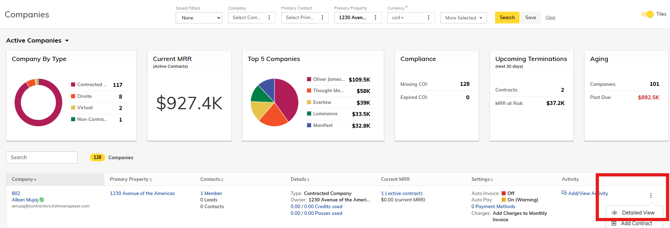
Navigate to the member account using any of the search or filter features. Select Detailed View to navigate to the Company's Dashboard.
Step 2 -
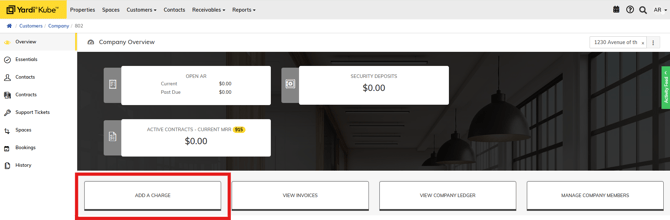
Select "Add a Charge"
Step 3 -
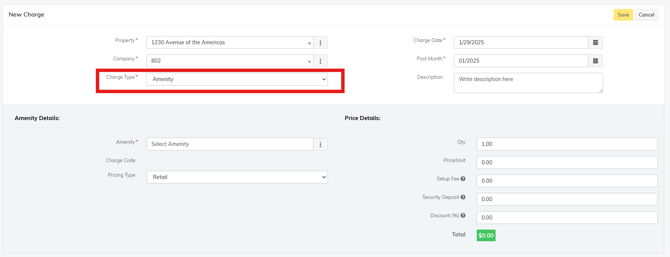
Select the Charge Type - Menu includes: Amenities, Credit, Security Deposit, or Custom.
SOME Amenities require a Contract Amendment (Task for Karina) as they would affect the recurring monthly charges.
Do NOT add charges for services like: IT Upgrades, Additional Members, Additional Credits, Storage, Keycard Swipe Data, etc. Adhoc charges should only be used for one time charges.
Amenity Charges
Amenity charges would be for features like handyman services, cleaning, lost keycards, porters, one off mail forwarding. See the bottom of the article for full list of amenities.
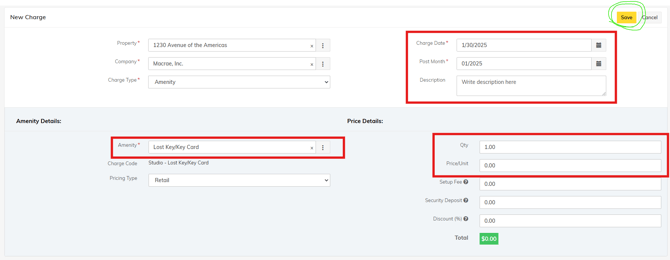
Select the Amenity you want to add, and complete the required fields:
Charge Date = Invoice Date
Charge Month = Depends on where we are in the billing timeline.
Description = This will show up on the invoice, please add details for the member to see. Ex: Name of replacement keycard, describe request for additional cleaning, items moved by porters, etc.
Qty = usually 1, unless day passes/lost keys/keycards
Price = some amenities have standard pricing, some are discretionary between locations or depend on the service.
**Don't forget to hit SAVE.
Custom Charges
Custom Charges are used if the item is not found in the Amenities list:
Example - Event Rental
