
Step 1:
On the left-hand navigation bar, scroll down to “Settings”.

Step 2:
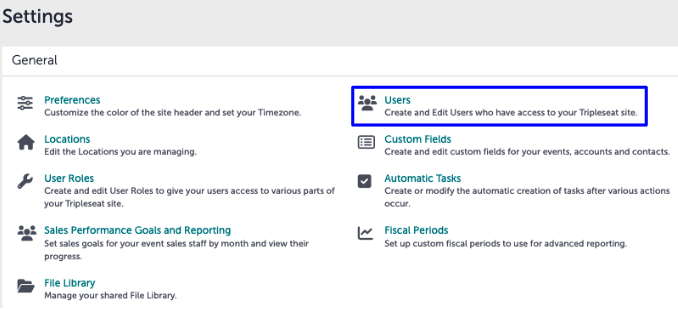
In the Settings window under “General”, click “Users”.
Step 3:
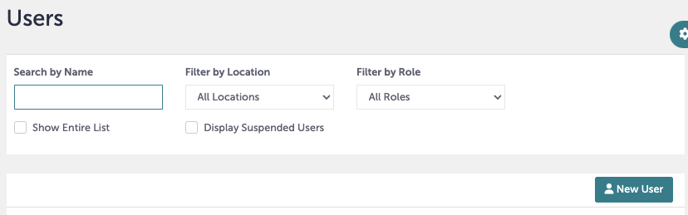
You are now at the Users screen. Click “New User” to create a new user.
Step 4:
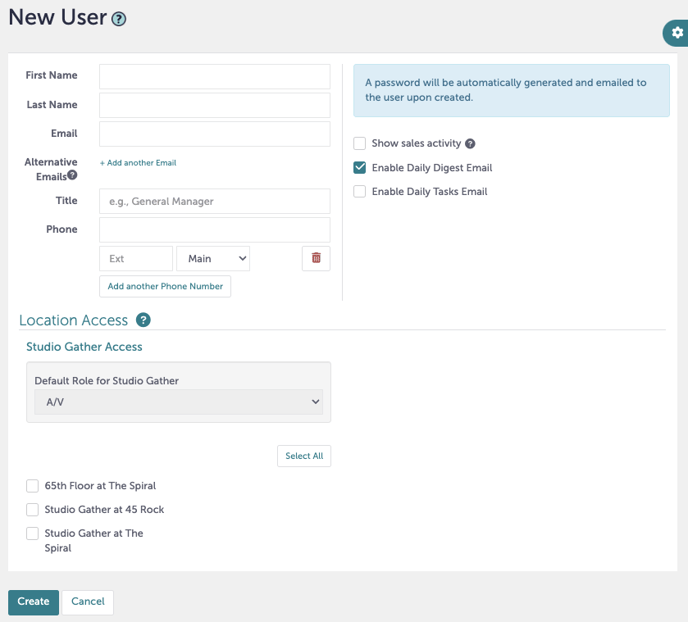
You will create a new user. You must at minimum have their name, email, title, location, and user role.
For a review on how to create new User Roles, please refer to this Knowledge Base article.
Step 5:
Fill in details under “Location Access”. Determine what their default role is, and select which locations this user will be associated with.
Step 6:
Click “Create”.
Step 7:
The user will receive an email with their new password. You will also receive a notification in green in Tripleseat showing you the new temporary password.
Step 8:
Was this article outdated or incorrect? Suggest a revision! Still need help? Submit a ticket!