
Step 1:
Navigate to the booking you would like to apply the rent statement against in Tripleseat.
Step 2:
Click on the "Payments" tab under the booking.

Step 3:
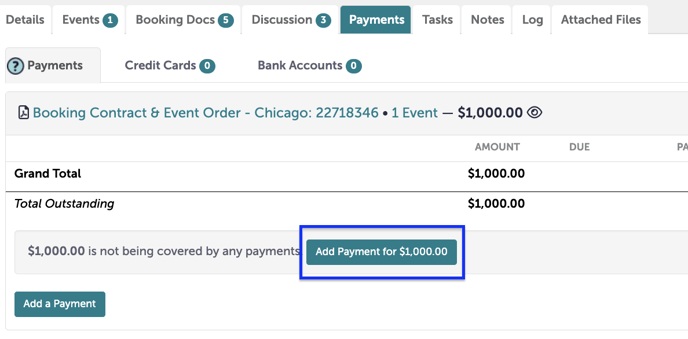
Click "Add a Payment for $XX".
Step 4:
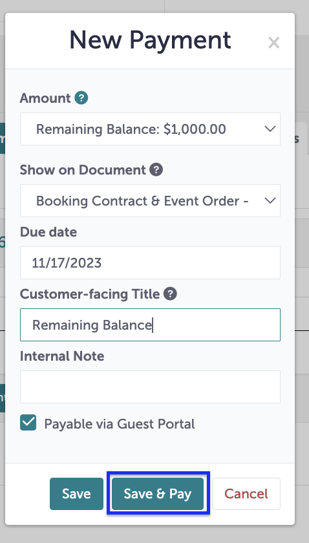
Enter the details of the payment, such as the due date and the customer-facing title (this will be visible on the guest portal). When you are done entering your details, click "Save & Pay".
Step 5:
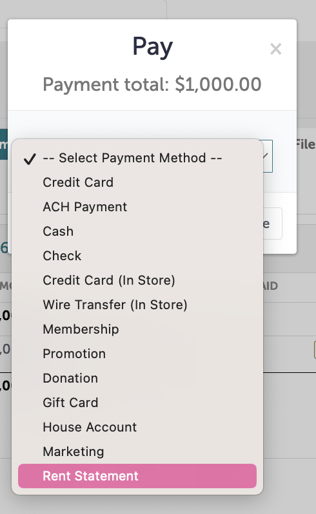
For your payment method, you will select "Rent Statement".
Step 6:
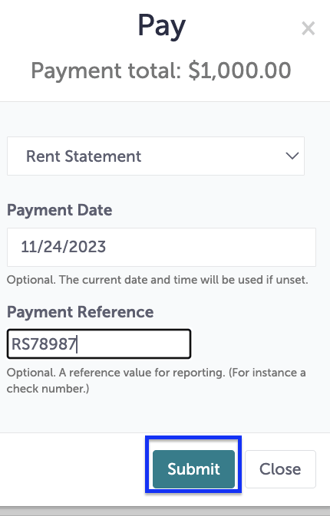
Add additional details, such as "Payment Date" and "Payment Reference". Click "Submit".
Step 7:
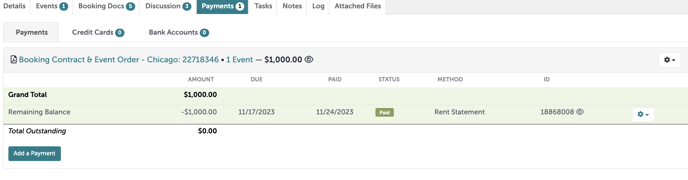
Your payment will be posted as "Paid" with a method of "Rent Statement".
Step 8:
Once a month, Rent Statements must be reconciled in Angus.
For a review on how to use reports in Tripleseat to reconcile Rent Statements, please refer to this article.
Step 9:
Was this article outdated or incorrect? Suggest a revision! Still need help? Submit a ticket!