
Step 1:
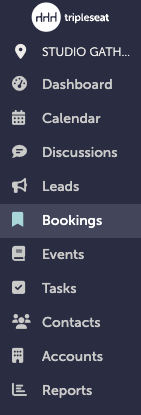
You will start by creating a new booking. You must navigate to "Bookings" on the left hand navigation window.
Step 2:
You can add bookings by selecting “+ New Booking” on the upper right hand corner of the "Bookings" page.

Step 3:
Now, you must create your booking and your event. You will start with the Booking. You will input as many details as you have into the booking. Required fields are: Name, Date Range, Start Time, End Time, Location, and Contact.
Hit "Create".
Step 4:
Now you will create your event. There are two ways you can add your event:
1. As you create your booking, you can scroll down before the "Create" button and hit "+New Event":
2. You can go into the Booking, go to the Event tab, and add an event there:
.gif?width=640&height=404&name=Bookings%20-%20Studio%20Gather%20-%20Tishman%20Speyer%20-%20Tripleseat%20(16).gif)
Step 5:
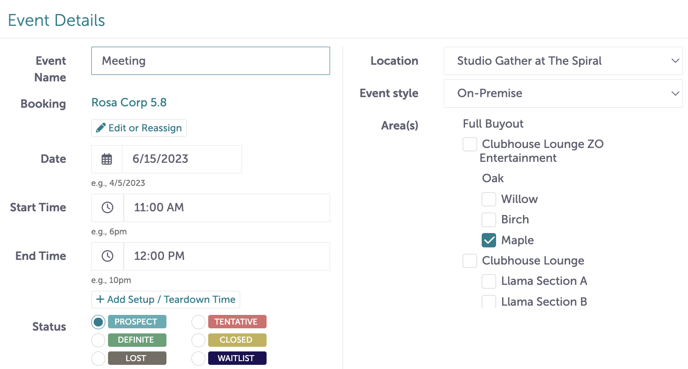
Input details of the event and hit "Update" at the bottom of the screen.
Step 6:
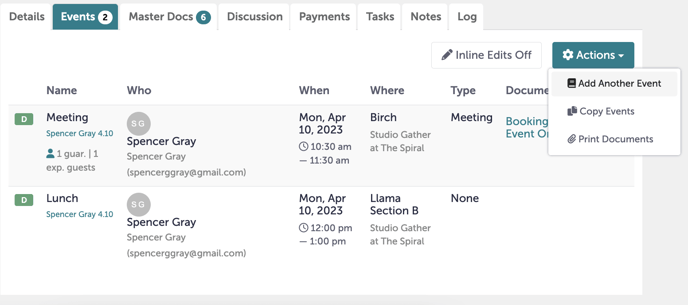
If this is a multi-day event, you can separate each day out into a separate event under this booking. Under the "Events" tab, click the "Actions" tab and click "Add Another Event". They will all live under the Booking.
Step 7:
Was this article outdated or incorrect? Suggest a revision! Still need help? Submit a ticket!