
Forms Needed:
Fully Executed Member Agreement
Broker W9
Broker Invoice
Broker Agreement Commission Submission Form
Step 1. Complete Member Agreement (New Deal or Renewal)
Step 2. Once the agreement has been fully executed, use the calculator linked above to determine the commission rate.
Brokers are paid 12% for the first 12 months of an agreement, and 2% for months 13-24.
Renewals are paid at the same 2% rate.
Step 3. Complete the Broker Commission Template in Word
Ensure that you complete all of the highlighted fields with the relevant information for your Entity, Brokerage, Broker, Member, Commission Rate, and Terms.
If the deal is a renewal deal or after the initial 12 months, remove the highlighted section in segment 2 as it does not apply.
Make sure to review all pages! Ask your leasing manager to review before sending to the Broker for signature.
Step 4. Send Commission Agreement to Broker & Head of Studio for Signature.
Send the word document and pdf copy to the Broker for review over email. The Broker should sign and return the document in a pdf format.
Once signed by the Broker, send to Nate Pinsley via DocuSign.
Once fully executed, save a copy of the dually signed agreement as you will need this for the Broker Commission Submission Form.
Step 5. Send FE Commission Agreement to Broker and ask for W9 and Invoice
Once the Broker Agreement form is fully executed, send it back to the broker and ask them for their W9 and an invoice for payment. You will need these for step 6.
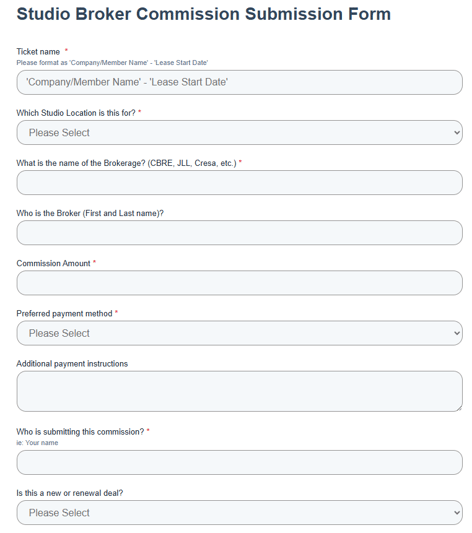
Step 6. Complete the Broker Commission Submission Form.
Using all of the required documents listed at the top of this article, complete the form with all the required information. You will need to attach the fully executed copies of all documents, agreements, invoices, and W9.
Step 7. CBRE & TS AP will review, confirm, and process the payment to the Broker.
Once the form is submitted, the information is submitted to CBRE and TSAP to review, approve, and process the payment to the Broker.
Once the payments are posted, you will see them on Tableau in your Operating Statement under Broker Commissions. You will need to refer to this section during your P&L conversation to confirm that each commission does relate to a new deal or renewal.