
Step 1:
Navigate to the booking you want to edit.
Step 2:
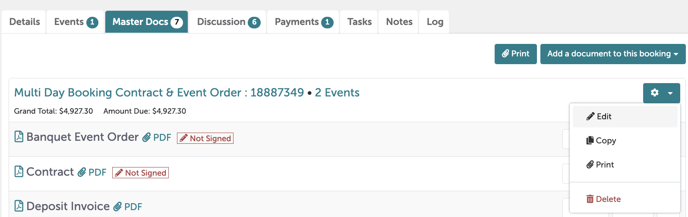
Scroll down to the “Master Docs” tab; scroll to the gear icon on the right-hand side. Select "Edit".
Step 3:
You are now in an editing window for the window. Under the first tab, "Booking", scroll all the way down to see the breakdown of charges.
.gif?width=640&height=392&name=Bookings%20-%20Studio%20Gather%20-%20Tishman%20Speyer%20-%20Tripleseat%20(4).gif)
Step 4:
From here, you can click the red trash can icon next to various fees and remove them if applicable. For example, you can delete the credit fee by clicking on the red trash can to the right of “Credit Card Fee” if the client paid for their event using any other payment method.
Step 5:
Once your edits are complete, hit "Save". This will save your changes and update all your documents.
Step 6:
Was this article outdated or incorrect? Suggest a revision! Still need help? Submit a ticket!