
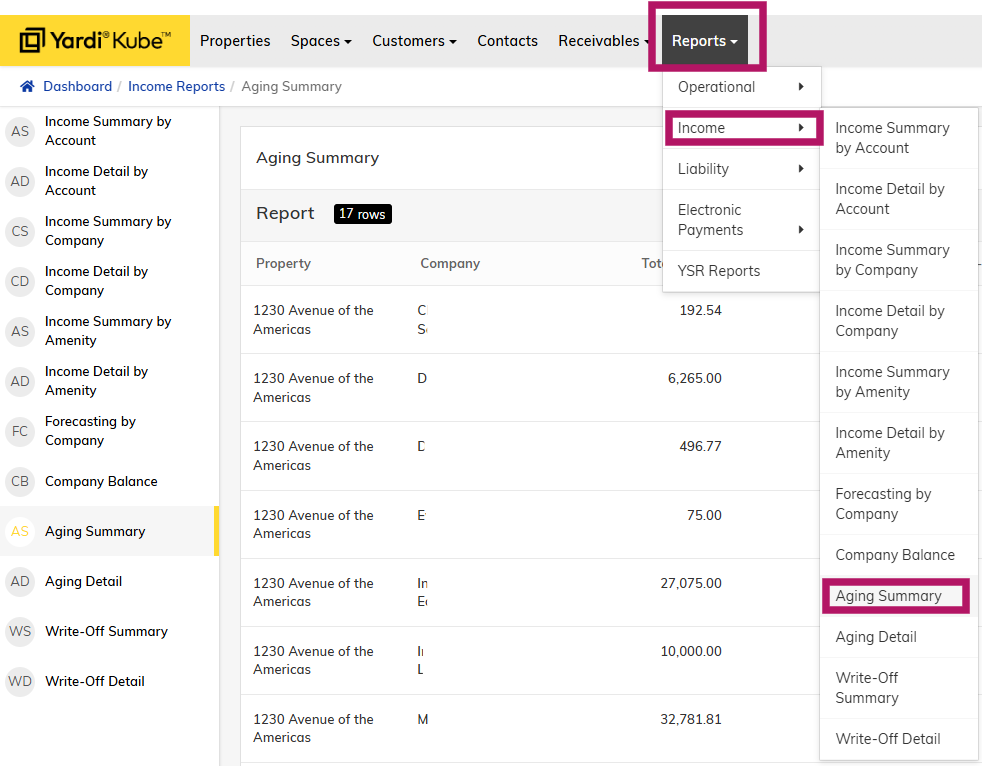
Step 1 - Log into Yardi Kube and navigate to Reports > Income > Aging Summary
Step 2 - Filter by the desired time frame to organize the data
0-30 days with a balance are members that have not paid their current month's invoice.
31-60 days with a balance are members that have not paid the previous month's invoice
61-90 days with a balance are members that have not paid an invoice from 2 months prior and should be noted on P&L and escalated to an RGM for potential termination after 3 attempts to collect have been sent by the onsite teams.
90+ days with a balance may have AR imported from Operate.
You can download the report to Excel to make comments about communication and attach in the P&L Review document.
Automatic Reminders & Late Fees:
- Yardi sends automatic payment reminders on the 5th of the month warning members that they will be considered late if they do not make payment.
- Yardi sends another automatic reminder on the 10th warning members that they are now late and a 10% fee on the outstanding balance has been applied.
- Late Fees sit in "Open Charges" and will be applied on the next month's invoice. Ex: A late payment for March invoice will show on April invoice.
- Late Fees can currently be archived if you wish to waive the late fee. Archived charges cannot be undone.