
How are bookings from members at other locations handled?
When a member from another location makes a booking, an automatic HubSpot email is sent to the onsite team at the booking location. Example: If a member from 1230 AoA books at The JACX, The JACX team receives the notification.
Booking Rules:
-
Home location members – Can book 24/7.
-
Visiting members (other locations) – Can book only between 9 AM and 5 PM.
-
Bookings made outside this window will be automatically canceled and credits refunded.
-
The member will receive an automated email explanation.
-
Do Members need a username & password to make bookings?
NO! There is a Single Sign On (SSO) Integration from VTS <-> Yardi which will allow members to log in using their Your Studio App username & password.
Members will still access from the Your Studio App, but will be brought to the Yardi Booking page to book, view bookings and view invoices (if they have permission).
When are credits pulled from the company bank?
If the booking is in the same month - credits are pulled immediately (when the booking is created) from the account
- Ex 1: Booking made on 9/1/25 for 9/10/25 will be withdrawn on 9/1/25
- Ex 2: Booking made on 9/10/25 for 9/10/25 will be withdrawn on 9/10/25
If the booking is for a future month - credits are pulled on the 1st of the month of the booking, so a company has an accurate count of how many credits are left for that month.
- Ex 3: Booking made on 9/1 for 10/20/25 will be withdrawn on 10/1/25
Where are internal and external notes displayed?
- Internal - shown only to Studio Team Administrators in the booking
- External - shown on Member View booking confirmation email
What kind of credits are available to members?
- Total Credits Per Month- included with membership based on desk count (standard 5 credits per desk); expire at the end of each month and are replenished on the 1st of each month.
- One-Time credits - DO NOT EXPIRE and can be carried over month to month. These credits are used first (before monthly credits) when a booking is created. Members can purchase one-time credits as an adhoc charge.

How can Members see how many credits they have?
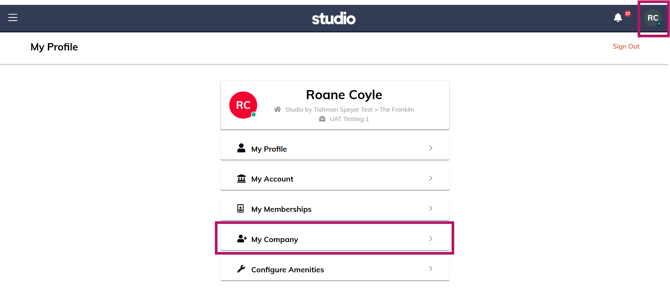
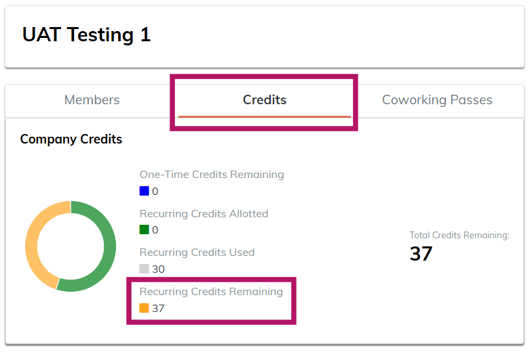
Members can see how many credits are available from the full company pool of credits when they log in by navigating to "My Profile" -> "My Company" -> "Credits"
What happens if a booking needs more than the credits a company has left?
All available credits will be deducted first, and a pro-rated charge will be created and live in Pending/Open Charges until the next monthly invoice.
- Ex: A booking is 10 credits, but a company only has 2 credits left for the month. Two credits will be deducted from the credit bank, an open charge for the dollar value of 8 credits ($200) will be added to the company's Open Charges.
Can Members make recurring meeting room bookings?
Yes! This is an option when you select the room and time. Member will select the days of the week and how many weeks to repeat.
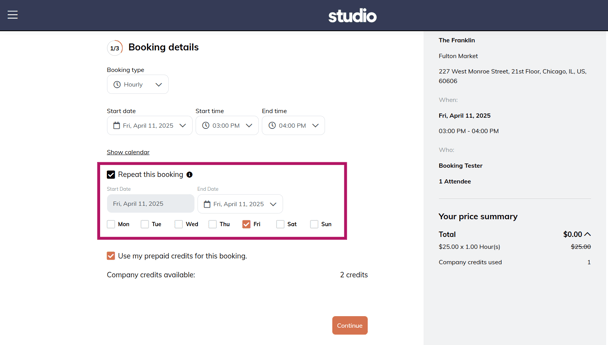
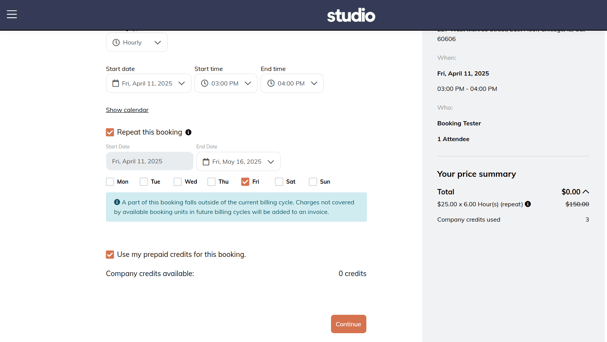
If Recurring bookings cross over into a new month, Credits will be pulled on the 1st of each month and the member will see the below message warning them of the charges incurred.
Recurring bookings can be cancelled as one-offs or cancelled by the series.
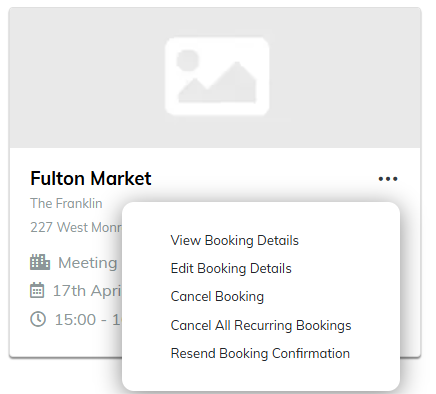
How do you cancel a booking on behalf of a member?
If a member asks you to cancel a booking for them, select the booking from the calendar or their company page. Select the booking they want and click "Cancel Booking". A pop-up screen will appear (image shown below), choose either “Cancel with fee” or “Cancel without fee”. Follow the refund policy (below) or ask your manager for more details. Click “Yes” to confirm.
Note: Onsite team will select “Cancel with fee” when the request to cancel was received within 60 mins from booking start time.
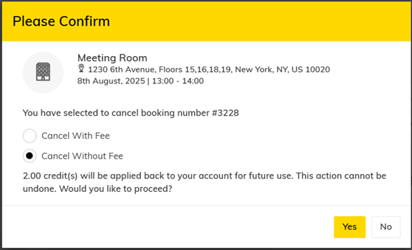
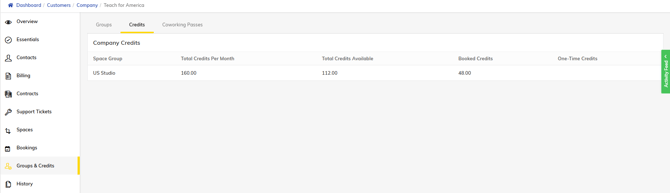
Credits or Dollar Values are returned immediately to the company's credit pool if cancelled more than 1 hour before the start time of the reservation. You can view a company's credits by navigating to the company page > "Groups & Credits" from the left side menu and selecting "Credits" tab:
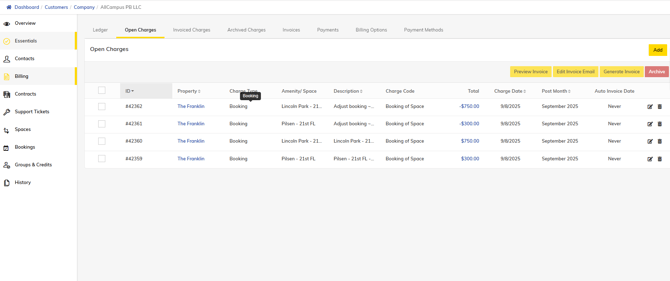
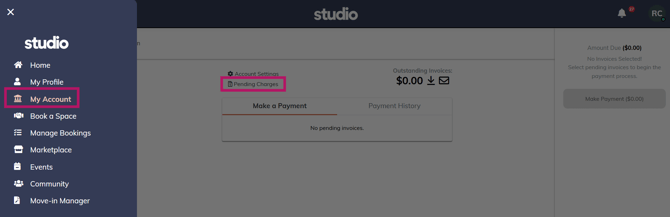
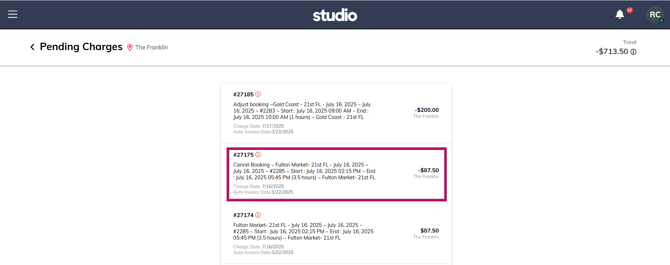
To view dollar value returned for a cancelled booking, navigate to the company page > "Billing" from the left side menu and select the "Open Charges" tab:
Below is the view in Member's Portal, if you need to help them navigate:
Refund Policy:
Meeting Rooms: Bookings cancelled up to 60 mins before the start of the reservation time will have the credits returned to the available company credit pool immediately. Bookings cancelled within 60 minutes of the reservation time has started are non-refundable.
Day Passes: Members have until 11PM the night before to cancel without penalty and the credits/dollar value are refundable. Any cancellations after 11PM will be non-refundable.
If booking is made with both credit and cash, both will refund back to their company account.
Which bookings can Members view and manage on the app/portal?
Currently Members can only view and manage their own bookings. From a member, standpoint, there is no place to view all of the company's bookings.
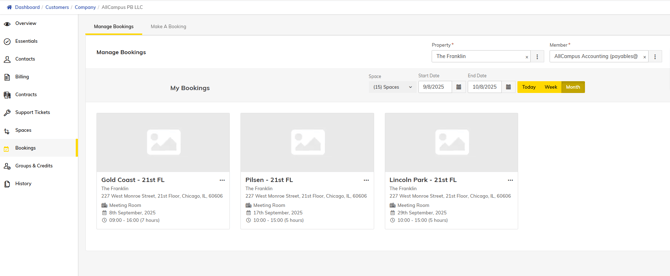
Studio employees can view all company bookings by navigating to the company page > Bookings and selecting a time frame. Please note that you DO NOT need to select a member and that selecting a member will NOT show just that member's bookings:
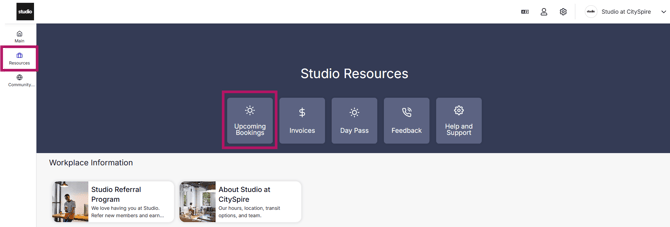
Members can view their bookings in the Yardi Member Portal in the sidebar under "Manage Bookings" or by navigating from the Studio App -> "Resources" -> "Upcoming Bookings"
Yardi Member Portal View: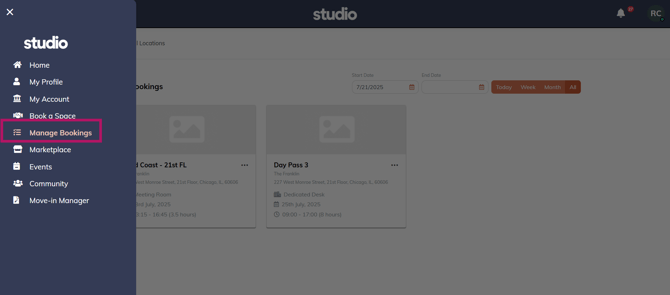
From Studio App:
How are credits refunded back to an account?
If a company has not exceeded their monthly credits and cancels a booking, the credits for the booking will be added to the company's credit pool.
If a company has exceeded their monthly credits and has a booking paid for in dollars, the refunded credits will be applied to the dollar booking and a refund (for the dollar amount) added to open charges.
If the cancelled credit booking value is higher than the dollar booking, the remaining value of the cancelled credit booking will be returned to the account as credits (there is no scenario where a member can make a profit from a cancelled booking).